
[:en]Weekly C++ 8- std::thread (II)[:] "Pin It")
![[:tr]Haftalık C++ 8- std::thread (II)[:en]Weekly C++ 8- std::thread (II)[:]](https://sp-ao.shortpixel.ai/client/to_webp,q_glossy,ret_img,w_32,h_32/https://yazilimperver.net/wp-content/uploads/2017/12/FeaturedImage-e1580417052514.png)
[:tr]Evet, thread ile ilgili yazılarımıza devam etme zamanı geldi. Bu yazımda, sizlere thread kütüphanesi içerisinde bulunan ve C++ kullanarak multithreaded yazılım geliştirme esnasında, size faydası dokunacağını düşündüğüm yapılardan bahsedeceğim. Thread kütüphanesi ve ilgili girizgahı bir önceki yazımda yapmıştım, eğer onu okumadıysanız, mutlaka okumanızı öneririm. Aşağıda ilgili yazıma ve serinin diğer yazılarına ilişkin bağlantıları bulabilirsiniz:
Haftalık C++ 7- std::thread (I)
Haftalık C++ 8- std::thread (II)
Haftalık C++ 10- std::thread (III)
Aslında, ilk etapta, senkronizasyon yapılarından da bahsetmeyi planlıyordum fakat daha sonra bu yazıyı sadece yardımcı yapılarak ayırıp, senkronizasyon yapıları için ayrı bir yazı yazmaya karar verdim. Öbür türlü, yazıyı takip etmek ve bütünlüğü korumak gerçekten zor olacaktı. Bu yazımda sizlere aktaracağım konular ise: async, futures, promises, packaged_tasks ve son olarak atomics veri yapıları. Evet hadi o zaman, başlayalım.
std::async:
async ‘<future>‘ kütüphanesi tarafından farklı prototipleri sunulan, bağımsız şablon bir fonksiyondur (template function). Bu fonksiyonlar, parametre olarak geçirilen fonksiyonları asenkron olarak koşturup (bu genelde ayrı bir thread oluşturularak ve koşturulması ile sağlanır, ama geliştirici bundan soyutlanır), sonucu ve koşum durumunu std::future nesnesi (birazdan açıklayacağım) olarak dönerler. Aslında görebileceğiniz üzere, bu yapı, basit thread kullanım ihtiyaçlarınızı gidermek için geliştirilmiş bir üst seviye yapı olarak değerlendirilebilir. Diğer bir deyişle, bu metot kullanarak yapacağınız herhangi bir işi Thread kütüphanesinin diğer yapılarını da kullanarak yapabilirsiniz.
Tahmin edebileceğiniz üzere, bu metotlara, fonksiyon, fonksiyon işaretçisi, fonksiyon nesnesi ve lambda fonksiyonlarını, ihtiyaç duydukları parametreleri ile birlikte geçirebilirsiniz. Bu parametreleri de async() metotlarına parametre olarak geçirebilirsiniz. İlgili metodun dokümantasyonun verilen aşağıdaki örnek kod, aslında bu kullanımları güzel bir şekilde özetliyor:
1 2 3 4 5 6 7 8 9 10 11 12 13 14 15 16 17 18 19 20 21 22 23 24 25 | #include <iostream> #include <vector> #include <algorithm> #include <numeric> #include <future> template <typename RandomIt> int parallel_sum(RandomIt beg, RandomIt end) { auto len = end - beg; if (len < 1000) return std::accumulate(beg, end, 0); RandomIt mid = beg + len/2; auto handle = std::async(std::launch::async, parallel_sum<RandomIt>, mid, end); int sum = parallel_sum(beg, mid); return sum + handle.get(); } int main() { std::vector<int> v(10000, 1); std::cout << "The sum is " << parallel_sum(v.begin(), v.end()) << '\n'; } |
Bu fonksiyon ve parametreler yanında async metodu, bir de çalıştırma politikası denile ve üç farklı değer alan bir parametre de kabul etmektedir:
- std::launch::async
- Verilen iş asenkron olarak, farklı bir thread içerisinde koşturulur.
- std::launch::deferred
- Verilen iş dönülen std::future nesnesinin get() metodu çağrıldığında koşturulur.
- std::launch::async | std::launch::deferred
- Varsayılan parametre budur. Bu parametre değeri geçirildiği durumda, sistemin mevcut yüküne göre: senkron ya da asenkron çağrılabilir. Geliştiricinin bunun üzerinde kontrolü yoktur.
async() kullanımını daha iyi anlamanıza yardımcı olacağını düşündüğüm bir örnek kod daha ekliyorum (alıntıladığım kaynağa da referanslardan ulaşabilirsiniz):
1 2 3 4 5 6 7 8 9 10 11 12 13 14 15 16 17 18 19 20 21 22 23 24 25 26 27 28 29 30 31 32 33 34 35 36 37 38 39 40 41 42 43 44 45 46 47 48 49 50 51 52 53 54 55 56 57 | #include <string> #include <chrono> #include <thread> #include <future> using namespace std::chrono; std::string fetchDataFromDB(std::string recvdData) { // Bu metodun tamamlanmasının 5 saniye süreciğini garantile std::this_thread::sleep_for(seconds(5)); // Bu sırada veri tabanı bağlantısı ya da veri odaklı işleri halledebiliriz return "DB_" + recvdData; } std::string fetchDataFromFile(std::string recvdData) { // Bu metodun tamamlanmasının 5 saniye süreciğini garantile std::this_thread::sleep_for(seconds(5)); // Bu sırada veri odaklı işleri halledebiliriz return "File_" + recvdData; } int main() { // Başlangıç zamanını tutualım system_clock::time_point start = system_clock::now(); // Aşağıdaki kullanımda toplam süreyi 5 saniyeye indiriyoruz std::future<std::string> resultFromDB = std::async(std::launch::async, fetchDataFromDB, "Data"); // Aşağıdaki kullanımda ise 10 sn bir süre geçiyor // std::string dbData = fetchDataFromDB("Data"); // Dosyadan veriyi çekelim std::string fileData = fetchDataFromFile("Data"); // Veri tabanın veriyi çekelim // future<std::string> object nesnesi hazır olana kadar bloklar. std::string dbData = resultFromDB.get(); // Bitiş zamanını alalım auto end = system_clock::now(); auto diff = duration_cast < std::chrono::seconds > (end - start).count(); std::cout << "Total Time Taken = " << diff << " Seconds" << std::endl; // Verileri birleştirelim std::string data = dbData + " :: " + fileData; // Birleştirilmiş veriyi basalım std::cout << "Data = " << data << std::endl; return 0; } |
Bu arada, yukarıda verdiğim örnekte dikkat etmenizi istediğim nokta std::future nesnesine ilişkin get() API’sinin çağrıldığı zaman mevcut thread’i verilen iş tamamlanıncaya kadar bloklamasıdır. Bunun yanında, std::async() metodundan dönülen std::future nesnesinin yıkıcısı çağrıldığında da, benzer şekilde mevcut thread bloklanır. Aşağıda buna ilişkin bir kullanım gösterdim:
1 2 3 4 5 6 | // Sample from Scott Meyers' Blog void f() { std::future<void> fut = std::async(std::launch::async, [] { /* compute, compute, compute */ }); } |
Bunun ile ilgili daha detaylı bilgilere Scott Meyers’in sayfasından ulaşabilirsiniz: Scott’s blog post.
Şimdi, std::future’a bakma zamanı.
std::future & std::promise:
C++11 thread kütüphanesi ile gelen bir diğer yapı da std::future sınıfıdır. Bunun kullanmak için ‘<future>’ başlık dosyasını kaynak kodunuza eklemeniz gerekiyor. Bu yapı, yukarıda gördüğünüz gibi async() metodu yanında std::packaged_task ve std::promise yapıları ile de kullanılmaktadır. Peki ne yapar bu sınıf? Bu sınıfın temel işlevi, kısaca async() metodu gibi thread koşumlarında, ilgili değerlerin dönülmesine sağlamaktır.
Geleneksel olarak, thread’ler arasında veri paylaşımını gerçekleştirmek için, mutex ve benzeri thread senkronizasyon yapılarını kullanmanız gerekmektedir. Dahası, gerçekleştirilen bu işlem sonrasında, çağıran sınıfı haberdar etmek için de std::conditional_variable tarzı yapıları da kullanmanız gerekebiliyor. std::future, bu tarz temel ihtiyaçları gidermek için sunulan bir sınıf. Bu sınıf, cağrılan thread tarafından sağlanacak olan veriyi tutar ve ilgili çağıran buna erişmesi için gerekli olan alt yapıları geliştiriciye sunmadan kotarır. Ne zamanki, çağıran sınıf std::future nesnesine ilişkin get() API’sini çağırır, o zaman ilgili iş bitene kadar bu thread bloklanır ve verilen iş bitince de ilgili değer dönülür.
Bu sınıfa benzer şekilde, std::promise sınıfı da aslında std::future ile dönülecek bir değer için söz olarak kabul edilebilir. Bir diğer deyişle, her bir std::promise nesnesi ile ilintili bir std::future nesnesi bulunur ve bu ilgili değeri çağırana sağlar. Peki std::promise‘in buradaki kullanımı nedir? std::promise nesnesi, std::future nesnesi ile birlikte paylaştığı verinin, ilgili thread içerisinde atanması için gerekli arayüz sunar. Bu kadar açıklamanın biraz kafa karıştırıcı olabileceğinin farkındayım, yine referanslarda verdiğim bir kaynakta buraya koyduğum aşağıdaki figür, bu iki nesne arasındaki ilişki ve kullanımlarını çok güzel özetliyor:
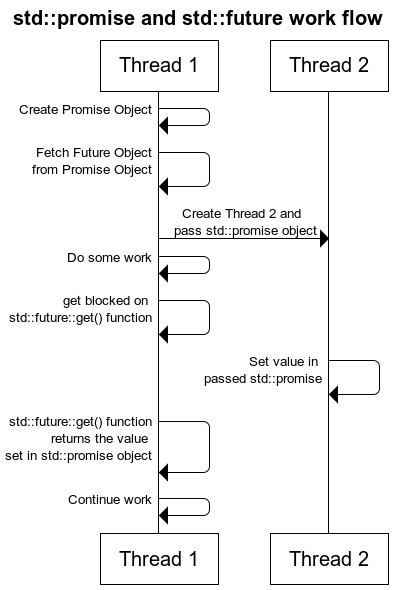
Burada std::promise nesnesi aslında arkada iki thread arasında paylaşılacak olan veriyi ifade/temsil ediyor. std::future nesnesi ise bu std::promise nesnesi üzerinden dönülecek değeri temsil ediyor. Genel kullanımı baktığımız zaman, ilgili threadi oluşturan, öncelikle bir std::promise nesnesi oluşturuyor ve buna ilintilendirilmiş bir ya da daha fazla std::future nesnesini ediniyor. Daha sonra std::promise nesnesini, oluşturacağı yeni thread’e geçiriyor ve yeni thread bu nesne üzerinden paylaşılacak olan veriyi atıyor ya da hata durumunu iletiyor. Bu aşamada, std::future nesneleri üzerinden ilgili dönüş değerinin atanıp/atanmadığı ya da bir hata olup olmadığı sorgulanabilmektedir. Aşağıda bu iki sınıfın ilişkisini gösteren kod parçasını görebilirsiniz:
1 2 3 4 5 6 7 8 9 10 11 12 13 14 15 16 17 18 19 20 21 22 23 24 25 26 27 28 29 30 31 32 33 34 35 36 | #include <iostream> #include <thread> #include <future> #include <chrono> using namespace std::chrono_literals; void initialize(std::promise<int> && promObj) { std::cout << "Update the value represented by passed promise as 65" << '\n'; // 5 sn bekletelim std::this_thread::sleep_for(5s); // Çağrılan thread dönülecek olan değeri bunun üzerinden iletir. Burada promObj.set_exception() aracılığı ile ya da aşağıdaki // kodu yorumlayarak hata durumu oluşturabilirsiniz promObj.set_value(65); } int main() { std::promise<int> promiseObj; std::future<int> futureObj = promiseObj.get_future(); // İlgili std::promise nesnesini yeni oluşturulan threade geçirelim std::thread th(initialize, std::move(promiseObj)); std::cout << "Wait till task is completed (about 5 seconds)" << '\n'; // Oluşturulan thread işini bitene kadar, mevcut thread bloklanır std::cout << futureObj.get() << std::endl; // Oluşturulan thread tamamlanana kadar bekle th.join(); return 0; } |
Eğerü std::promise nesnesi, ilgili dönüş değeri çağrılmadan silinirse ve de oluşturan thread, std::future nesnesi üzerinden get() API’sini çağırır ise, hata durumu oluştur. Bunun yanında bir diğer kullanım ile birlikte, birden fazla std::promise nesnesini oluşturulan thread’lere geçirerek, çağıran sınıf bunlara ilişkin std::future nesnelerinden ayrı ayrı değerler elde edilebilir.
Bu iki yapıya ilişkin güzel bir açıklama da Rainer Grim tarafından şu yazıda verilmiş durumda. Özetleyecek olursak:
std::promise nesnesi:
- Bir değer dönülmesine, hata durumu belirlenmesine ya da bilgilendirme yapılmasına olanak sağlar.
std::future nesnesi:
- std::promise nesnesinden ilgili değerlerin çekilmesine,
- std::promise nesnesine, ilgili değerin hazır olup/olmadığının sorulmasına,
- std::promise nesnesi üzerinden ilgili işlemin bitmesinin beklenmesine,
- std::shared_future oluşturulmasına olanak sağlar.
Bu iki yapının kullanımına ilişkin bir diğer örnek koda göz atalım:
1 2 3 4 5 6 7 8 9 10 11 12 13 14 15 16 17 18 19 20 21 22 23 24 25 26 27 28 29 30 31 32 33 34 35 36 37 38 39 40 41 42 43 44 45 46 47 48 49 | // promiseFuture.cpp #include <future> #include <iostream> #include <thread> #include <utility> void product(std::promise<int>&& intPromise, int a, int b) { intPromise.set_value(a*b); } struct Div { void operator() (std::promise<int>&& intPromise, int a, int b) const { intPromise.set_value(a/b); } }; int main() { int a= 20; int b= 10; std::cout << '\n'; // İlgili std::promise nesnelerini oluşturalım std::promise<int> prodPromise; std::promise<int> divPromise; // Bunlardan std::future nesnelerini çekelim std::future<int> prodResult= prodPromise.get_future(); std::future<int> divResult= divPromise.get_future(); // Hesaplamaları ayrı bir thread'ten çekelim std::thread prodThread(product,std::move(prodPromise),a,b); Div div; std::thread divThread(div,std::move(divPromise),a,b); // Sonuçları toplayalım std::cout << "20*10= " << prodResult.get() << '\n'; std::cout << "20/10= " << divResult.get() << '\n'; prodThread.join(); divThread.join(); std::cout << '\n'; } |
std::future sınıfına benzer bir diğer sınıf da std::shared_future sınıfı. Bu sınıfın işlevini galiba en iyi dokümantasyonundaki (std::shared_future API dokümantasyonu) aşağıdaki tanım özetliyor:
std :: shared_future sınıf şablonu, gerçekleştirilecek olan bir işlemin dönüş değerine birden fazla thread’in erişmesine ve ilgili değerin için bekletilmesine olanak sağlar. std::future’dan farklı olarak (sadece taşınarak aktarılabilir), bu nesneler kopyalanabilir ve her bir kopya aynı ortak değere erişirler. Yalnızca hareketli olan std :: future’nin aksine (bu nedenle yalnızca bir örnek, herhangi bir zaman uyumsuz sonuca işaret edebilir), std :: shared_future kopyalanabilir ve birden çok paylaşılan gelecek nesnesi aynı paylaşılan duruma başvurabilir. Aslında, bir shared_future, std :: condition_variable :: notify_all ()’a benzer şekilde, aynı anda birden fazla iş parçacığına sinyal vermek için kullanılabilir. Bu sınıf, bir bakıma, birden fazla thread’i, std::condition_variable::notify_all() API’si gibi, haberdar etmek için kullanılabilir.
Hemen nasıl kullanıldığına örnek bir kod üzerinden bakalım:
1 2 3 4 5 6 7 8 9 10 11 12 13 14 15 16 17 18 19 20 21 22 23 24 25 26 27 28 29 30 31 32 33 34 35 36 37 38 39 40 41 42 43 44 45 46 47 48 49 50 51 52 53 54 55 56 57 58 59 60 61 | #include <iostream> #include <future> #include <chrono> int main() { // İlgili std::promise nesneleri std::promise<void> ready_promise, t1_ready_promise, t2_ready_promise; // İlgili threadlere paylaştırılacak olan std::shared_future nesnesi std::shared_future<void> ready_future(ready_promise.get_future()); std::chrono::time_point<std::chrono::high_resolution_clock> start; // Birinci lambda fonksiyonu auto fun1 = [&, ready_future]() -> std::chrono::duration<double, std::milli> { // ana (main) thread'i haberdar et t1_ready_promise.set_value(); // ana (main) thread'ten haber bekliyor ready_future.wait(); return std::chrono::high_resolution_clock::now() - start; }; // İkinci lambda fonksiyonu auto fun2 = [&, ready_future]() -> std::chrono::duration<double, std::milli> { // ana (main) thread'i haberdar et t2_ready_promise.set_value(); // ana (main) thread'ten haber bekliyor ready_future.wait(); return std::chrono::high_resolution_clock::now() - start; }; // İlgili std::promise nesnelerinden std::future nesnelerini çekelim auto fut1 = t1_ready_promise.get_future(); auto fut2 = t2_ready_promise.get_future(); // Thread'leri başlatalım auto result1 = std::async(std::launch::async, fun1); auto result2 = std::async(std::launch::async, fun2); // Threadlerden haber bekleyelim fut1.wait(); fut2.wait(); // Threadler hazırmış start = std::chrono::high_resolution_clock::now(); // Şimdi bekleyen thread'leri haberdar edelim ready_promise.set_value(); std::cout << "Thread 1 received the signal " << result1.get().count() << " ms after start\n" << "Thread 2 received the signal " << result2.get().count() << " ms after start\n"; return 0; } |
std::packaged_task:
std::future, promise ve async ile ilintili bir diğer sınıf da std::packaged_task<> sınıfı. Bu sınıf, asenkron olarak çağrılabilecek olan işlevleri temsil eder, async() metodu ise direk başlatıyordu hatırlarsanız (birazdan sekme sekme farkları da ifade edeceğim). İlgili işlevlerin dönüş değerleri veya hata durumları yine aynı nesne içerisinde tutulur ve std::future nesneleri üzerinden erişilir. Bu sınıf aşağıdakileri kapsar:
- Çağrılabilir birimleri ki bunlar bağımsız bir fonksiyon, fonksiyon işaretçisi, lambda fonksiyonu ya da fonksiyon nesnesi,
- İlgili çağrılabilir birimlere ait dönüş değeri veya hata durumlarının saklandığı veri.
Burada ilgili std::packaged_task nesnesinden elde edeceğiniz std::future nesnesi ile ilgili işlevden dönülen değere ve hata durumuna bakabilirsiniz. Aşağıda bu sınıfın kullanımına ilişkin örnek bir kod bulabilirsiniz:
1 2 3 4 5 6 7 8 9 10 11 12 13 14 15 16 17 18 19 20 21 22 23 24 25 26 27 28 29 30 31 32 33 34 35 36 37 38 39 40 41 42 43 44 45 46 47 48 49 50 51 52 53 54 55 56 57 58 59 60 61 62 63 64 65 | #include <iostream> #include <cmath> #include <thread> #include <future> #include <functional> // Sayının üssünü hesaplama için örnek fonksiyon int f(int x, int y) { return std::pow(x, y); } void taskLambda() { // packaged_task nesnesi lambda fonksiyonu ile std::packaged_task<int(int,int)> task([](int a, int b) { return std::pow(a, b); }); // Sonuç kontrol etmek için future nesnesini edinelim std::future<int> result = task.get_future(); // İşlevi başlatalım task(2, 9); // Sonuç için bekleyelim std::cout << "taskLambda:\t" << result.get() << '\n'; } void taskBind() { // packaged_task metot bağlama kullanımı std::packaged_task<int()> task(std::bind(f, 2, 11)); std::future<int> result = task.get_future(); // İşlevi başlatalım task(); std::cout << "taskBind:\t" << result.get() << '\n'; } void taskThread() { // packaged_task standart fonksiyon ile kullanımı std::packaged_task<int(int,int)> task(f); std::future<int> result = task.get_future(); // İlgili threade std::packaged_task nesnesini geçirelim ve işlevi başlatalım std::thread task_td(std::move(task), 2, 10); // Threadin tamamlanmasını bekleyelim task_td.join(); std::cout << "taskThread:\t" << result.get() << '\n'; } int main() { taskLambda(); taskBind(); taskThread(); return 0; } |
Yukarıdaki örnekten de göreceğiniz üzere std::packaged_task nesnelerini kopyalayamazsınız, sadece taşıyabilirsiniz. Bu sebeple, ilgili nesne, threadlere geçirilmeden önce genelde, std::future nesnesi tutulur (thread e ilgili std::packaged_task nesnesi taşınacağı için elimizde bir kopya kalmaz).
Gelelim sadede, packaged_task ile async metodu arasındaki fark ne peki? Güzel bir soru? Bu farkları kısaca aşağıdaki gibi özetleyebiliriz:
- İlk olarak, async çağrısı ile ilgili işlev hemen başlatılır, fakat std::packaged_task durumunda kontrol sizdedir. Ne zaman başlat API’sini çağırırsanız o zaman başlar,
- std::packaged_task nesnesinde elde edeceğiniz std::future nesnesine ait get() API’sini çağırmadan, ilgili std::packaged_task işlevini başlatmış olmalısınız. Yoksa uygulamanız sonsuza kadar takılı kalır,
- async metodunda ilgili işlevin hangi thread’te çağrılacağını belirleyemezsiniz. Fakat, std::packaged_task nesneleri farklı thread’lere aktarılarak orada çalıştırılabilir,
- Aslında async() arka tarafta std::packaged_task mekanizmasını kullanıyor gibi düşünebilirsiniz. std::packaged_task biraz daha alt seviye bir özellik ve async’in yaptığı iş std::thread ve std::packaged_task kullanılarak gerçekleştirilebilir.
Evet sstd::packaged_task konusu da bu kadar.
Atomics:
Bir önceki yazımı okuduysanız, multithreaded programlama da dikkat etmeniz gereken en önemli konulardan birisi de thread’ler arası paylaşılan verilerin korunmasıdır. Bu anlamda thread kütüphanesinde, bir sonraki thread yazımda da anlatacağım üzere, bir çok yapı bulunmakta. Bu yazımda ise thread kütüphanesi ile gelen ve basit veriler için bu tarz yapılardan bizi kurtaran bir yapıdan bahsedeceğim. Bunlar: Atomik Tiplerdir. İlgili referans (std::atomic library referans sayfası) sayfasında da ifade edildiği üzere bu yapılar, içerisinde barındırdığı veri tiplerine, bir çok thread’in erişimine herhangi bir “data race” ya da problem olmadan, senkronize bir şekilde erişimini sağlarlar. Daha fazla detaya girmeden önce hemen örnek bir kod üzerinden geçelim:
1 2 3 4 5 6 7 8 9 10 11 12 13 14 15 16 17 18 19 20 21 22 23 24 25 26 | class ShredCounter { public: void increment() { ++mValue; } void decrement() { --mValue; } int get() { return mValue } void set(int newValue) { mValue = newValue; } private: // Paylaşılacak olan veri int mValue; }; |
Yukarıdaki örnek kodun üzerinden geçer geçmez, bu sınıfın multithreaded ortamlar için uygun ve güvenli olmadığını anlamışsınızdır. Normal şartlarda std::mutex ve benzeri yapıları kullanarak bunu güvenli hale getirebiliriz. Şimdi, bu kodu atomik tipleri kullanarak nasıl güvenli hale getirebileceğimize bakalım.
Öncelikli olarak atomik tipler de, yukarıda bahsettiğim sınıflar gibi şablon bir sınıf (template class). Kullanabilmek için <atomic> başlık dosyasını eklemeniz gerekiyor. Bu sınıfın şablon parametresi olarak da paylaşmak istediğiniz veri tipini giriyorsunuz (kütüphane içerisinde bilindik veri tipleri için hazır tipler mevcut. Bu yapının alt tarafta kullandığı senkronizasyon mekanizması, ilgili kütüphane gerçeklemesine ve parametre olarak geçirilen tipe bağlı. Basit veri tipleri için, ör. int, long, float, bool, vb., std::mutex ve benzeri yapılardan çok daha performanslı ve “lock-free” şekilde erişim sağlanabilir (tabi burada “lock-free” olması işlemci tarafından sunulan işlemci komutlarına bağlı). Eğer daha karmaşık tipler kullanır iseniz de, sistem, arka tarafta std::mutex’leri kullanarak gerekli senkronizasyon işlevini yerine getiriyor. Bu arada “lock-free” desteği ayrıca sunulan is_lock_free() API’is ile de kontrol edilebilir. https://en.cppreference.com/w/cpp/atomic/atomic/is_lock_free sayfasından aldığım aşağıdaki örnek kod ile devam edelim:
1 2 3 4 5 6 7 8 9 10 11 12 13 14 15 16 17 18 19 20 21 | #include <iostream> #include <utility> #include <atomic> struct A { int a[100]; }; struct B { int x; int y; }; int main() { std::cout << std::boolalpha << "std::atomic<A> is lock free? " << std::atomic<A>{}.is_lock_free() << '\n' << "std::atomic<B> is lock free? " << std::atomic<B>{}.is_lock_free() << '\n'; } |
Bu sınıf tarafından sunulan API’ler store() ve load() metotlarıdır. Bunlar ilgili verilere erişim ve güncelleme için kullanabilirler. Aynı zaman atama operatörü de kullanılabilir. Bir diğer kullanışlı API ise exchange()’dir, bu API verilen parametreyi ilgili atomik değişkene atar ve önceki değeri döner. Son olarak kullanabileceğiniz iki API daha var. Bunlar compare_exchange_weak() ve compare_exchance_strong(). Bunlar ise değişkene veri atama işini sadece verilen değer mevcut değere eşit ise yapar. Son üç API, genelde “lock-free” algoritmalar ve veri yapılarında sıklık ile kullanılır (umarım bu konu ile ilgili de bir yazı sizler ile paylaşacağım). Ayrıca bütün tam sayı tipleri için ++, –, fetch_add, fetch_sub operatör ve API’leri de tanımlıdır (tam liste için https://en.cppreference.com/w/cpp/atomic/atomic’e başvurabilirsiniz).
Şimdi, yukarıdaki sınıfımız std::atomic’i kullanarak güvenli hale getirelim:
1 2 3 4 5 6 7 8 9 10 11 12 13 14 15 16 17 18 19 20 21 22 23 24 25 26 27 28 | #include <atomic> class ShredCounter { public: void increment() { ++mValue; } void decrement() { --mValue; } int get() { return mValue.load(); } void set(int newValue) { mValue.store(newValue); } private: // Thread'ler tarafından paylaşılacak değişken std::atomic<int> mValue; }; |
Kanaatimce, atomiklerin en büyük avantajı, basit tipler için performans ve okunabilirlik. Bu sebeple, özellikle basit veri tipleri için olabildiğince std::atomics’leri kullanmanızı tavsiye ediyorum.
C++ 20 ile birlikte bu tiplere bazı eklemeler de yapıldı. Artık std::shared_ptr ve weak_ptr’da atomik olarak kullanılabilecek. Detaylı bilgi için şu sayfaya göz atabilirsiniz: https://en.cppreference.com/w/cpp/atomic/atomic.
Bu arada, atomik’ler ile ilgili bir diğer konu da bellek sıralaması (https://en.cppreference.com/w/cpp/atomic/memory_order) ki ben bu konuya girmedim. İlgili referans dokümanda da özetlendiği gibi, bu mekanizma, atomik ve önceki/sonraki işlemci komutlarının nasıl sıralandığını tanımlıyor. Bu konu ile ilgili daha detaylı bilgi almak için bahsettiğim sayfaya göz atabilirsiniz.
Bir sonraki yazımda görüşmek dileğiyle 🙂
Referanslar:
- https://thispointer.com/c11-multithreading-part-9-stdasync-tutorial-example/
- https://en.cppreference.com/w/cpp/atomic
- https://www.developerfusion.com/article/138018/memory-ordering-for-atomic-operations-in-c0x/
- https://bartoszmilewski.com/2008/12/01/c-atomics-and-memory-ordering/
- http://scottmeyers.blogspot.com/2013/03/stdfutures-from-stdasync-arent-special.html
- http://www.modernescpp.com/index.php/promise-and-future
- https://en.cppreference.com/w/cpp/atomic/atomic
- https://en.cppreference.com/w/cpp/atomic/memory_order
[:en]Well, it is time to continue our thread discussion. In this post, I am going to write about some supporting constructs that I believe you need to know while developing multithreaded applications for C++. As you may guess, most of the multithreading background information is given in my previous post, so if you have not read that post, I strongly suggest to check that first which can be accessed with below link:
Initially, I was planning to continue with synchronization constructs, but then decided to cover other constructs and devote a seperate post for that topic. Otherwise, the content of this post will be very much and hard to track. The topics that I will cover in this post are async, futures, promises, packaged_tasks and finally atomics. So, let us start.
std::async:
async is the name of template functions that are provided in ‘<future>’ library. This methods are used to execute provided functions asynchronously (usually implemented as seperate thread that is not visible to developer) and returns the result (and status) in an instance of std::future which I will explain in next section. So, it can be seen as a high level construct for std::threads. As you may guess, you can pass functions, function pointers, function objects and lambda function to async function as well as parameters. Parameters expected by corresponding function can be passed to std::async() as arguments. Following sample code from its reference page summarizes its usage:
1 2 3 4 5 6 7 8 9 10 11 12 13 14 15 16 17 18 19 20 21 22 23 24 25 | #include <iostream> #include <vector> #include <algorithm> #include <numeric> #include <future> template <typename RandomIt> int parallel_sum(RandomIt beg, RandomIt end) { auto len = end - beg; if (len < 1000) return std::accumulate(beg, end, 0); RandomIt mid = beg + len/2; auto handle = std::async(std::launch::async, parallel_sum<RandomIt>, mid, end); int sum = parallel_sum(beg, mid); return sum + handle.get(); } int main() { std::vector<int> v(10000, 1); std::cout << "The sum is " << parallel_sum(v.begin(), v.end()) << '\n'; } |
In addition to functions and parameters, std::async also accepts a launch policy parameter which can take three values:
- std::launch::async
- Guarantees the asynchronous behaviour i.e. passed function will be executed in seperate thread.
- std::launch::deferred
- Non-asynchronous behaviour i.e. function will be called when other thread will call get() on future object to access the shared state.
- std::launch::async | std::launch::deferred
- Its the default behaviour. With this launch policy it can run asynchronously or not depending on the load on system. But we have no control over it.
I am adding another sample code (from one of reference that I gave at the end of post) which I believe will help you to understand the std::async():
1 2 3 4 5 6 7 8 9 10 11 12 13 14 15 16 17 18 19 20 21 22 23 24 25 26 27 28 29 30 31 32 33 34 35 36 37 38 39 40 41 42 43 44 45 46 47 48 49 50 51 52 53 54 55 56 57 | #include <string> #include <chrono> #include <thread> #include <future> using namespace std::chrono; std::string fetchDataFromDB(std::string recvdData) { // Make sure that function takes 5 seconds to complete std::this_thread::sleep_for(seconds(5)); //Do stuff like creating DB Connection and fetching Data return "DB_" + recvdData; } std::string fetchDataFromFile(std::string recvdData) { // Make sure that function takes 5 seconds to complete std::this_thread::sleep_for(seconds(5)); //Do stuff like fetching Data File return "File_" + recvdData; } int main() { // Get Start Time system_clock::time_point start = system_clock::now(); // With following usage we reduce time to 5 seconds std::future<std::string> resultFromDB = std::async(std::launch::async, fetchDataFromDB, "Data"); // With following usage, it will take 10 seconds // std::string dbData = fetchDataFromDB("Data"); //Fetch Data from File std::string fileData = fetchDataFromFile("Data"); // Fetch Data from DB // Will block till data is available in future<std::string> object. std::string dbData = resultFromDB.get(); // Get End Time auto end = system_clock::now(); auto diff = duration_cast < std::chrono::seconds > (end - start).count(); std::cout << "Total Time Taken = " << diff << " Seconds" << std::endl; //Combine The Data std::string data = dbData + " :: " + fileData; //Printing the combined Data std::cout << "Data = " << data << std::endl; return 0; } |
It should be noted that, the get() API of std::future object will block the current thread till corresponding task function completes its processing. Moreover, std::future object returned from std::async() will also block when its destructor is called as illustrated below:
1 2 3 4 5 6 | // Sample from Scott Meyers' Blog void f() { std::future<void> fut = std::async(std::launch::async, [] { /* compute, compute, compute */ }); } |
You can find more details about this in Scott’s blog post.
Now, it is time to look at std::future.
std::future & std::promise:
Another construct that come with C++ 11 is std::future. To use that, you should include ‘<future>’ library. In fact, it is used with async() methods as we saw in previous section as well as std::packaged_task and std::promise. So what is the use of std::future? You may guess that it is somehow related with returning values from threads (at least ones created by async) by looking at the sample given above.
Traditionally, you need to share data with corresponding thread via synchronization constructs such as mutexes which are used to protect it. Additionally, you need to also come up with a mechanisms to inform the caller about the result of operation (usually via std::conditional_variable). So what is alternative? Well, you may use std::future for this purpose.
It is again a class template and its object stores the value that will be provided by callee. In other words, it internally stores the value that will be assigned by callee (which of course protected by underlying mechanisms) and then let caller access this value via .get() API. It should be noted that if .get() method is called before callee set the value then this call will block the current thread till value is available.
Similarly, std::promise is also a class template and its object state a promise to set the value in future. So, each std::promise object has an associated std::future object that will give the value once it is set by the std::promise object. A std::promise object shares data with its associated std::future object and provides an interface for callee to set the value. The following diagram that took from the reference that I gave at the end, summarizes their relationship and how they are working together:
A std::promise object represents an object whose value/error can be set. On the other hand, a std::future represents the result of a std::promise object. In other words, the caller of the future value/error will first create a std::promise and return one or more std::futures from it. Then it passes it to callee and the callee will either set a value or error on the std::promise objects passed. Afterall, all std::future objects can be checked to see if std::promise got resolved or rejected. Sample code given below illustrates this simple relationship:
1 2 3 4 5 6 7 8 9 10 11 12 13 14 15 16 17 18 19 20 21 22 23 24 25 26 27 28 29 30 31 32 33 34 35 | #include <iostream> #include <thread> #include <future> #include <chrono> using namespace std::chrono_literals; void initialize(std::promise<int> && promObj) { std::cout << "Update the value represented by passed promise as 65" << '\n'; // Wait for 5 seconds std::this_thread::sleep_for(5s); // If you comment below line or use promObj.set_exception() API call then caller encounter with an exception promObj.set_value(65); } int main() { std::promise<int> promiseObj; std::future<int> futureObj = promiseObj.get_future(); // Pass (move :) also promise object std::thread th(initialize, std::move(promiseObj)); std::cout << "Wait till task is completed (about 5 seconds)" << '\n'; // Block current thread till value is updated std::cout << futureObj.get() << std::endl; // Wait thread for completion th.join(); return 0; } |
If std::promise object is destroyed prior to setting the value and caller calls the get() API on associated std::future object, then an exception will be thrown. Another usage that might be required is multiple return values in which multiple std::promise objects can be passed to thread and the caller can obtain values from associated std::future objects.
Another good explanation is given by Rainer Grim in this post in which he summarizes these two constructs as follow:
A std::promise permits:
- To set a value, a notification or an exception. That result can in addition delayed be provided by the promise.
A std::future permits:
- To pick up the value from the promise,
- To asks the promise, if the value is available,
- To wait for the notification of the promise. That waiting can be done with a relative time duration or an absolute time point. => Replacement for condition variables,
- To create a shared future (std::shared_future).
Now let us look at another sample code provided in given post which also illsutrate std::future and std::promise usages:
1 2 3 4 5 6 7 8 9 10 11 12 13 14 15 16 17 18 19 20 21 22 23 24 25 26 27 28 29 30 31 32 33 34 35 36 37 38 39 40 41 42 43 44 45 46 47 48 49 | // promiseFuture.cpp #include <future> #include <iostream> #include <thread> #include <utility> void product(std::promise<int>&& intPromise, int a, int b) { intPromise.set_value(a*b); } struct Div { void operator() (std::promise<int>&& intPromise, int a, int b) const { intPromise.set_value(a/b); } }; int main() { int a= 20; int b= 10; std::cout << '\n'; // define the promises std::promise<int> prodPromise; std::promise<int> divPromise; // get the futures std::future<int> prodResult= prodPromise.get_future(); std::future<int> divResult= divPromise.get_future(); // calculate the result in a separat thread std::thread prodThread(product,std::move(prodPromise),a,b); Div div; std::thread divThread(div,std::move(divPromise),a,b); // get the result std::cout << "20*10= " << prodResult.get() << '\n'; std::cout << "20/10= " << divResult.get() << '\n'; prodThread.join(); divThread.join(); std::cout << '\n'; } |
There is also another construct similar to std::future which is std::shared_future. Its description is best summarized with following description given in std::shared_future API document:
The class template std::shared_future provides a mechanism to access the result of asynchronous operations, similar to std::future, except that multiple threads are allowed to wait for the same shared state. Unlike std::future, which is only moveable (so only one instance can refer to any particular asynchronous result), std::shared_future is copyable and multiple shared future objects may refer to the same shared state. In fact, a shared_future may be used to signal multiple threads simultaneously, similar to std::condition_variable::notify_all().
Let us see how it is used in following sample code:
1 2 3 4 5 6 7 8 9 10 11 12 13 14 15 16 17 18 19 20 21 22 23 24 25 26 27 28 29 30 31 32 33 34 35 36 37 38 39 40 41 42 43 44 45 46 47 48 49 50 51 52 53 54 55 56 57 58 59 | #include <iostream> #include <future> #include <chrono> int main() { // Promise instances std::promise<void> ready_promise, t1_ready_promise, t2_ready_promise; // Shared ready_future instance which will be passed to threads for synchronization std::shared_future<void> ready_future(ready_promise.get_future()); std::chrono::time_point<std::chrono::high_resolution_clock> start; // First lambda function auto fun1 = [&, ready_future]() -> std::chrono::duration<double, std::milli> { t1_ready_promise.set_value(); // waits for the signal from main() ready_future.wait(); return std::chrono::high_resolution_clock::now() - start; }; // Second lambda function auto fun2 = [&, ready_future]() -> std::chrono::duration<double, std::milli> { t2_ready_promise.set_value(); // waits for the signal from main() ready_future.wait(); return std::chrono::high_resolution_clock::now() - start; }; // Obtain futures from thread promises auto fut1 = t1_ready_promise.get_future(); auto fut2 = t2_ready_promise.get_future(); // Start thread executions with provided lambda functions auto result1 = std::async(std::launch::async, fun1); auto result2 = std::async(std::launch::async, fun2); // wait for the threads to become ready fut1.wait(); fut2.wait(); // the threads are ready, start the clock start = std::chrono::high_resolution_clock::now(); // signal the threads to go ready_promise.set_value(); std::cout << "Thread 1 received the signal " << result1.get().count() << " ms after start\n" << "Thread 2 received the signal " << result2.get().count() << " ms after start\n"; return 0; } |
std::packaged_task:
Another construct related with std::future, std::promise and async is std::packaged_task<>. It is a class template and represents a asynchronous task which can be invoked asynchronously. Its return value or exception thrown is stored in a shared state which can be accessed through std::future objects. It encapsulates:
- A callable entity i.e either standard function, member function pointer, lambda function or function object,
- A shared state that stores the value returned or thrown exception by associated callback.
So you can request std::future object from std::packaged_task and then query the result via this instance as illustrated in following sample code which also illustrate possible usage of std::packaged_task with different callables:
1 2 3 4 5 6 7 8 9 10 11 12 13 14 15 16 17 18 19 20 21 22 23 24 25 26 27 28 29 30 31 32 33 34 35 36 37 38 39 40 41 42 43 44 45 46 47 48 49 50 51 52 53 54 55 56 57 58 59 60 61 62 63 64 65 | #include <iostream> #include <cmath> #include <thread> #include <future> #include <functional> // Example function to calculate power int f(int x, int y) { return std::pow(x, y); } void taskLambda() { // packaged_task instance with lambda function std::packaged_task<int(int,int)> task([](int a, int b) { return std::pow(a, b); }); // Obtain future instance for checking the result std::future<int> result = task.get_future(); // Initiate task execution task(2, 9); // Wait for result std::cout << "taskLambda:\t" << result.get() << '\n'; } void taskBind() { // packaged_task instance with method binding std::packaged_task<int()> task(std::bind(f, 2, 11)); std::future<int> result = task.get_future(); // Initiate task execution task(); std::cout << "taskBind:\t" << result.get() << '\n'; } void taskThread() { // packaged_task instance with passing standard method std::packaged_task<int(int,int)> task(f); std::future<int> result = task.get_future(); // Pass task to thread and start execution std::thread task_td(std::move(task), 2, 10); // wait for thread completion task_td.join(); std::cout << "taskThread:\t" << result.get() << '\n'; } int main() { taskLambda(); taskBind(); taskThread(); return 0; } |
In above sample, you should note that packaged_task instance should be moved, in other words, it is not copy-able. So usually, future object should be obtained before it is moved to corresponding thread.
At this point, you may wonder about the differences between packaged_task and async method. Well, it is a good question to ask 🙂 Let me try to summarize the differences as follow:
- First of all, async immediately start to execute, but you need to invoke packaged_task instance for execution,
- Closely related with previous item, you need to invoke packaged_task instance before calling get() API on obtained std::future instance. Otherwise, your program will freeze and never become ready,
- You can not specify the thread that async function will run. However, you can pass (move in fact as ween above) std::packaged_task to other threads that will execute given task,
- std::packaged_task can be assumed as a lower level feature for implementing std::async (which is why it can do more than std::async if used together with other lower level stuff, like std::thread). In other words, a std::packaged_task is a std::function linked to a std::future and std::async that wraps and calls a std::packaged_task (possibly in a different thread).
Well that’s all for std::packaged_task. N
Atomics:
If you read my previous post, you should note that we should take care of the data that we are going to share with multple threads and use synchronization constructs for this purpose. Although we will cover these constructs in other posts, let us look at another library provided with STL that allows us to update data from multiple threads without using such constructs. These are called Atomic Types. As described in std::atomic library reference page, these types encapsulate a value whose access is guaranteed to not cause data races and can be used to synchronize memory accesses among different threads. Well, before delving into more details, let us look at an example code where we would like to update some members from different threads:
1 2 3 4 5 6 7 8 9 10 11 12 13 14 15 16 17 18 19 20 21 22 23 24 25 26 | class ShredCounter { public: void increment() { ++mValue; } void decrement() { --mValue; } int get() { return mValue } void set(int newValue) { mValue = newValue; } private: // Value that will be shared int mValue; }; |
It should be obvious that above class is not suitable for multithreaded environment, but it can be safe with using constructs that I desribed above such as mutexes. Let us look at, how we can make this code safe employing atomic types.
Atomic types are used through a template class which is called std::atomic. You should include <atomic> header file to use this library. You can provide the data type that should be used for atomic operation (there are also various type alias for known data types). The underlying syncronization mechanism depends on corresponding library implementation and type that provided to this class. For integral types such as int, long, float, bool, etc. there will be much less overhead than mutexes and can be used as lock-free (in fact underlying mechanism depends on lock-free atomic CPU instructions). However, if you use other types for atomics, mutexes will probably be employed for synchronization and use of atomics provides no performance gain except simplier syntax. The lock-freeness can be checked via is_lock_free() API. Following sample from https://en.cppreference.com/w/cpp/atomic/atomic/is_lock_free is a good example:
1 2 3 4 5 6 7 8 9 10 11 12 13 14 15 16 17 18 19 20 21 | #include <iostream> #include <utility> #include <atomic> struct A { int a[100]; }; struct B { int x; int y; }; int main() { std::cout << std::boolalpha << "std::atomic<A> is lock free? " << std::atomic<A>{}.is_lock_free() << '\n' << "std::atomic<B> is lock free? " << std::atomic<B>{}.is_lock_free() << '\n'; } |
The functions provided by std::atomic class are store() and load() which automically update and obtain the contents of the std::atomic type. Another function is exchange(), that sets the atomic variable to a new value and returns the value held previously. Finally, there are also two functions compare_exchange_weak() and compare_exchance_strong() that performs atomic exchange only if the value is equal to the provided parameter. Last three functions are usually used to implement lock-free algorithms (hopefully, I will also write about this topic). There are also specialized functions for for all integral data types such as operators ++, –, fetch_add, fetch_sub (full list can be found at https://en.cppreference.com/w/cpp/atomic/atomic) which are obvious from their names 🙂
Now let us make our class thread safe using std::atomic:
1 2 3 4 5 6 7 8 9 10 11 12 13 14 15 16 17 18 19 20 21 22 23 24 25 26 27 28 | #include <atomic> class ShredCounter { public: void increment() { ++mValue; } void decrement() { --mValue; } int get() { return mValue.load(); } void set(int newValue) { mValue.store(newValue); } private: // Value that will be shared std::atomic<int> mValue; }; |
In my opinion, main advantages of atomics is its performance advantage (for integral types) and readibility. Hence, I strongly advice you to use std::atomics, if you need to perform atomic operations on integral types.
There are also some additions to atomics with C++ 20. It is now possible to also use shared and weak smart pointers with atomics library as explained in https://en.cppreference.com/w/cpp/atomic/atomic.
By the way, there is also another topic closely related with atomics: memory ordering (https://en.cppreference.com/w/cpp/atomic/memory_order) which I have not mentioned. As described in its reference page it specifies how regular, non-atomic memory accesses are to be ordered around an atomic operation. So if you would like to learn more details about this topic, you can out the references that I have added.
See you in my next post.
References:
- https://thispointer.com/c11-multithreading-part-9-stdasync-tutorial-example/
- https://en.cppreference.com/w/cpp/atomic
- https://www.developerfusion.com/article/138018/memory-ordering-for-atomic-operations-in-c0x/
- https://bartoszmilewski.com/2008/12/01/c-atomics-and-memory-ordering/
- http://scottmeyers.blogspot.com/2013/03/stdfutures-from-stdasync-arent-special.html
- http://www.modernescpp.com/index.php/promise-and-future
- https://en.cppreference.com/w/cpp/atomic/atomic
- https://en.cppreference.com/w/cpp/atomic/memory_order
[:]