
[:en]Weekly C++ 7- std::thread (I)[:] "Pin It")
![[:tr]Haftalık C++ 7- std::thread (I)[:en]Weekly C++ 7- std::thread (I)[:]](https://sp-ao.shortpixel.ai/client/to_webp,q_glossy,ret_img,w_32,h_32/https://yazilimperver.net/wp-content/uploads/2017/12/FeaturedImage-e1580417052514.png)
[:tr]Bir başka haftalık C++ yazısı ile tekrar beraberiz. Bu yazımda, sizlere C++ 11 ile birlikte sunulmaya başlanan bir kütüphane bilgi aktaracağım. Bu kütüphaneden daha önce tamamladığım Modern C++ yazılarımda bahsetmemiştim (neden diye sormayın), ama artık vakti geldi. Eminim geliştirdiğiniz programlarda, özellikle çoklu çekirdeğe sahip işlemciler için :), bir noktada buna ihtiyacınız olmuştur. Evet, tahmin edebileceğiniz üzere bu kütüphane thread kütüphanesi. Çoklu çekirdekli işlemcilerin yaygınlaşması ile birlikte, multithreaded (çok fazla kafa karıştırmamak adına bu şekilde kullanacağım) uygulama geliştirme artık önemli bir kabiliyet haline geldi. Uzun bir süre, C++ programlama dilini kullanarak multithreaded yazılım geliştirmek için platform bağımlı Win32 soketleri, MFC soketleri, PThreads ve benzeri API’leri kullanmak zorunda kalıyorduk (eğer tabi Boost ya da POCO kullanmıyor iseniz). C++ 11’den önce nasıl multithreaded yazılım geliştirildiğini merak ediyorsanız, şu bağlantıdaki yazıya bir göz atabilirsiniz.
Seriye ilişkin yazılara aşağıdaki bağlantılardan ulaşabilirsiniz:
Haftalık C++ 7- std::thread (I)
Haftalık C++ 8- std::thread (II)
Haftalık C++ 10- std::thread (III)
Giriş:
C++ 11 ile birlikte, STL ile sunulan Thread kütüphanesini kullanarak, çoklu platform için, standard bir şekilde multihreaded yazılım geliştirebiliyoruz. Eğer daha önce bir şekilde, Boost Thread library kullanarak multithreaded yazılım geliştirdiyseniz, C++ 11 ile kütüphanesinin de, büyük ölçüde bu kütüphaneye dayandığını bilmek sizi sevindirecektir. Tabi burada özel olarak, sizi Boost ya da başka bir kütüphaneyi kullanmaya sizi zorlayan bir neden yok ise STL ile sunulan std::thread kütüphanesini kullanmalısınız.
Yazımın devamında, multithreaded yazılım geliştirmenize yardımcı olacak bazı thread ve benzeri kavramlara ilişkin bilgi aktaracağım. Sonrasında ise diğer yazılarımda olduğu gibi önemli kabiliyetleri örnek kodlar üzerinden sizlere aktaracağım. Tabi kütüphane oldukça büyük, bu yazılarda bütün ince ayrıntıların üzerinden geçmek imkansız. Hatta bu yazımda sadece temel thread API’lerinden bahsedip, başka bir yazımda yardımcı yapılardan bahsetmeyi planlıyorum. Eğer, bu konu ile ilgili açıkta bir husus kaldığını düşünüyor iseniz bir sonraki yazıda olabilir, ya da hiç beklemeden direk sorabilirsiniz. Hadi başlayalım.
Thread’lere giriş:
Bildiğiniz üzere, haftalık C++ yazılarımda olabildiğince detaylara girmemeye gayret ediyorum 🙂 ama bu sefer de, bir istisna yapalım ve threadler nedir sorusuna bir göz atalım. Bu konuya ilişkin gerçek anlamda detaylı bir bilgi almak istiyorsanız, nadide ders kitaplarımızdan olan Tanenbaum’s Modern Operating Systems book kitabının “Processes and Threads” konusunu okumanızı şiddetle tavsiye ederim, daha C++ ağırlıklı bilgi için ise Anthony Williams C++ Concurreny in Action books kitabına bir göz atabilirsiniz. Ben bu başlık altında, verdiğim kaynaklarda detayları anlatılan konulara ilişkin özet bilgi geçeceğim.
Öncelikli olarak threadleri (iş parçacığı) daha iyi anlayabilmek için programlara, işlemlere (process) ve bunların birbirleri ile olan ilişkilerine bakmamız gerekiyor. Programlar, çeşitli C++ benzeri programlama dilleri ile geliştirilmiş olan kodların derlenip, bağlanması ile elde edilen ikili sisteme uygun saklanan (binary) dosyalardır (Python ve benzeri dillerde ise ilgili kaynak kod çalışma zamanında ilgili platforma göre yorumlanır. Bu dosyalar, çalıştırılmak amacı ile belleğe alınana kadar, dosya sisteminde saklanırlar.
Bu program belleğe yüklendikten sonra, kabaca ilgili bütün kaynaklar ile birlikte işlem (Process) halini alır. Bu işlemler, belleğe yüklendikten sonra ilgili işletim sistemi tarafından yönetilirler ve her işletim sistemine özgü ek parametre veya kaynaklara sahip olabilirler ama genel olarak çoğu işletim sistemi bu işlemlere dair aşağıda verilen bilgileri tutar:
- Program/Yönerge Sayacı (Program/Instruction counter): Çalıştırılan uygulamada işlemcinin şu işeyeceği yönergeyi gösteren sayaç,
- Kayıt Alanları (Registers): CPU üzerinde bulunan veri slotları,
- Stack: Mevcut aktif rutin ya da fonksiyona ilişkin bilgileri tutan veri yapısı. Ayrıca geçici veriler de burada tutulur,
- Heap: Dinamik olarak ayrılan bellekler
- Dosya/Soket/Sinyal Kotarıcıları: Bu işlem tarafından açılan dosya, soket ve sinyal kotarıcıları.
Özellikle Stack ve Heap ile ilgili daha fazla bilgi edinmek için şu sonuçlara bakabilirsiniz.
Her bir işlem, kendisine ait bellek adres uzaylarına sahiptir, diğer işlemlerden bağımsız ve izole bir şekilde bu alan içerisinde çalışırlar. Bunlar diğer işlemlerin verilerine direk erişemezler. Bu bağımsızlık önemli, çünkü herhangi bir işlemde oluşacak bir problemin, diğer işlemleri etkilememesi veya bozmaması işletim sisteminin en önemli amacıdır ve bu bağımsızlık buna hizmet eder.
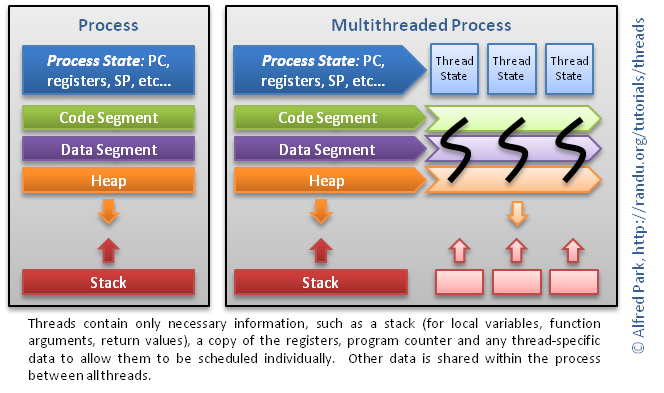
Şimdi thread’lere bir göz atalım. Thread’ler, işlemler içerisindeki işleri yerine getiren birimlerdir. Bu birimler aynı program/işlem içerisinde diğer birimlerden bağımsız bir şekilde kodların/yönergelerin koşturulmasını sağlarlar. Bazı kaynaklarda, thread’ler hafif işlem (lightweight processes) olarak da adlandırılmışlardır. Çünkü kendilerine ait stack’leri vardır ve bunlar diğer thread’ler ile paylaşılmaz, yani birbirlerinin stack’lerinde bulunana verilere erişemezler. Bunun ile birlikte işleme ait ve Heap’te bulunan verilere, soketlere ve dosya kotarıcılarına erişebilirler. Thread’ler aynı işlem içerisinde bulunurlar ve ilgili bellek adres uzayını paylaşırlar. Bu nedenler, işlemler arası haberleşmeye göre thread’ler arası haberleşmenin maliyeti çok daha azdır. Tabi burada, herhangi bir thread’te oluşacak problemin diğer thread’leri ve nihayetinde işlemin çalışmasını sekteye uğratma riski bulunmaktadır.
İşlem ve içerisindeki thread’ler arasındaki ilişki, aşağıdaki figürde gösterilmektedir. Detaylar için bu kaynağa bir göz atabilirsiniz.

Şimdi işlem ve thread’ler arasındaki farklara bakalım (Bilgisayar müh. öğrencileri OS sınavlarınıza belki yardımcı olur 😉
- İşlemler, threadlere göre daha yüklü işler için kullanılırlar,
- İşlemler, diğer işlemler ile belleklerini paylaşmazlar. Thread’ler ise aynı işlemi paylaştıkları thread’ler ile bir kısım belleği (heap) paylaşırlar,
- Thread’ler arası haberleşme, işlemler arası haberleşmeden genelde daha hızlıdır,
- İşletim sistemi açısından thread yönetimi (bağlam değişimi, vb.), işlem yönetimine göre daha ucuz ve kolaydır.
Thread ya da işlem kullanımı her ne kadar bu yazımızın konusu olmasa da, yukarıdaki sekmeler size bu konuda bir fikir vereceğini umuyorum. Ayrıca, bu kararın nasıl verildiğine ilişkin Google’dan güzel bir örnek, Örnek İşlem/Thread Seçim Analizi, de mevcut. Bir göz atabilirsiniz.
Şimdi konumuzla ilintili olan iki kavrama daha bir göz atalım: paralellik (parallelism) ve aynı anda kullanım (concurrency). Eğer kullandığınız bilgisayarın işlemcisi sadece bir çekirdeğe sahip ise, oluşturduğunuz thread’ler birbirleri ile birlikte paralel çalışırlar ama aynı anda çalışmazlar. Çünkü bir çekirdek fiziksel olarak aynı anda sadece bir yönergeyi işleyebilir. Bir diğer ifade ile, her bir thread, çekirdeğin zamanın bir kısmını alarak yönergeleri çalıştırır, daha sonra durdurulur ve diğer bir thread çalışmaya devam eder. Bu benzer şekilde diğer threadler için de aynı şekilde işler ve çekirdek zamanı aralarında paylaştırılır. Aslında tek çekirdek için aynı anda çalışma durumu yoktur. Bunun ile birlikte, eğer işlemciniz birden fazla çekirdeğe sahip ise, işte bu durumda, gerçek anlamda aynı anda kullanım sağlanır ve her bir çekirdekte aynı anda bir thread çalışabilir.
Tabi burada göz önünde bulundurulması gereken önemli bir nokta, sizlerin threadlerin işlemci üzerinde yönergeleri çalıştırma, zaman paylaşımı ve bunların önceliği konusunda kontrolünüz olmadığıdır. Bu konuda STL tarafından da bir yöntem de sunulmaz. Tabi burada çeşitli mutex veya benzeri üst seviye yapılar sayesinde el ile kontrolden bahsetmiyorum.
Son olarak, bu başlığı kapatmadan önce, multithreaded yazılım geliştirirken göz önünde bulundurmanız gereken iki husustan bahsedeceğim:
- Bunlardan ilki, multithreaded programlama kullanarak çözmeye çalıştığınız problemi doğru anlamanız. Yani problemin hangi kısımları paralelleştirilebilir ya da gerçekten problem buna uygun mudur? Pareto prensibine dayanarak şunu söyleyebiliriz ki: İşlemcinin %90 zamanı, kodun %10 kısmı için harcanır. Bu noktada kodun %90’nından ziyade, çalıştırılan %10 luk kısma odaklanmalısınız.
- İkinci konu ise paylaşılacak olan kaynaklardır. Thread’ler arası bu kaynakların emniyetli bir şekilde paylaşılması ve threadlerin bu kaynaklar için boşuna beklemelerinin önüne geçilmesi de önemli bir husustur. Bu noktada thread senkronizasyon yapıları devreye girer ki, bir sonraki yazımızda bu yapılara değineceğiz. Ama threadler arası emniyetli veri paylaşımı ve yöntemleri genelde programlama dillerinden bağımsız ortak yaklaşımlar ya da tasarım kalıpları ile çözülebilmektedir. Bu konu ile ilgili bir çok kaynak bulabilirsiniz.
Thread temelleri:
Evet, artık std::thread kütüphanesinin nasıl kullanılacağına bakabiliriz. Öncelikli olarak thread’lere ilişkin temel işlere bakacağız. Bu arada bu kütüphaneyi kullanabilmek için ihtiyaç duyulan derleyici gereksinimleri aşağıdaki gibidir:
Windows: Visual Studio 2012
Linux: gcc 4.8.1
Kütüphaneyi kullanmak için, <thread> dosyasını eklememiz gerekiyor. Basit bir şekilde ana thread (her C++ uygulaması varsayılan bir thread ile başlar) yanında yeni bir thread oluşturmak için, std::thread nesnesi oluşturup aşağıdaki çağrılabilir elemanlardan birisi ile bu nesneyi oluşturuyoruz:
- Statik bir üye sınıf metodu ya da bağımsız metot,
- Sınıf metot işaretçisi ve ilgili sınıf nesnesi,
- Fonksiyon nesneleri,
- Lambda fonksiyonları.
İlgili thread nesne oluşturulur oluşturulmaz çalışmaya başlar. Bunun ile birlikte mevcut thread ile birlikte kullanılabilecek std::this_thread isim uzayı (namespace) ile sunulan bir takım yardımcı metotlar bulunmaktadır. Aslında dört tane:
- sleep_for(): Mevcut thread’i verilen zaman boyunca uyutur (yani işlemci zamanı almaz).
- get_id(): Mevcut thread’e ilişkin kullanılabilecek tanımlayıcı bir sayı döner.
- yield(): Çağıran thread işlemci kullanımından tekrar planlanması amacı feragat eder, yani bekleyen diğer threadlere imkan sağlar.
- sleep_until(): Mevcut thread’i verilen zaman kadar uyutur. Daha sonra ilgili thread çalışmasına devam eder.
Aşağıdaki örnekte, ana thread’e ilaveten yukarıdaki yöntemler kullanılarak dört farklı thread oluşturuluyor. Ayrıca std::this_thread API’lerine ilişkin de örnek kod görülebilir:
1 2 3 4 5 6 7 8 9 10 11 12 13 14 15 16 17 18 19 20 21 22 23 24 25 26 27 28 29 30 31 32 33 34 35 36 37 38 39 40 41 42 43 44 45 46 47 48 49 50 51 52 53 54 55 56 57 58 59 60 61 62 63 64 65 66 67 68 69 70 71 72 73 74 75 76 77 78 79 80 81 82 83 84 85 86 87 88 89 90 91 92 93 94 95 96 97 98 99 100 101 102 103 104 105 106 107 108 109 110 111 112 113 114 | #include <thread> #include <memory> #include <chrono> #include <iostream> using namespace std::chrono_literals; constexpr int gLoopCount = 10000; /// Thread için bağımsız metot kullanımı void threadFunction() { std::cout << "[ThreadStandaloneFuncCallback] Thread started!" << '\n'; /// 2 sn bekle std::this_thread::sleep_for(2s); for(int i = 0; i < gLoopCount/10; i++) std::cout<<"Standalone function Executing"<<std::endl; std::cout << "[ThreadStandaloneFuncCallback] Thread completed!" << '\n'; } /// Sınıf üye kullanımı için örnek sınıf class Task { public: void execute(int count) { std::cout << "[ThreadMemberFuncCallback] Thread started!" << '\n'; std::cout << "[ThreadMemberFuncCallback] Thread ID: "<< std::this_thread::get_id() << '\n'; /// 2 sn bekle std::this_thread::sleep_for(2s); for(int i = 0; i < count; i++) std::cout<<"Member function Executing"<<std::endl; std::cout << "[ThreadMemberFuncCallback] Thread completed!" << '\n'; } }; /// Fonksiyon nesne kullanımı için örnek sınıf class DisplayThread { public: void operator()() { std::cout << "[ThreadFunctionObjectCallback] Thread started!" << '\n'; std::cout << "[ThreadFunctionObjectCallback] Thread ID: "<< std::this_thread::get_id() << '\n'; /// 2 sn bekle std::this_thread::sleep_for(2s); for(int i = 0; i < gLoopCount; i++) std::cout<<"Function Object Executing"<<std::endl; std::cout << "[ThreadFunctionObjectCallback] Thread completed!" << '\n'; } }; /// Ana thread tanımlayıcısı std::thread::id gMainThreadId = std::this_thread::get_id(); int main() { std::cout << "The Main Thread started. ID: " << gMainThreadId << '\n'; /// Çalışma zamanını ölçmek için auto start = std::chrono::high_resolution_clock::now(); /// Bağımsız metot örneği: İlgili fonksiyonu thread'e geçiriyoruz std::thread standaloneThreadObj(threadFunction); /// Thread tanımlayıcısına ilişkin kullanım std::cout << "[ThreadStandaloneFuncCallback] Thread ID: "<< standaloneThreadObj.get_id() << '\n'; /// Sınıf üye metot kullanımı: İlgili metot ve sınıf nesnesini geçirelim std::unique_ptr<Task> taskObj = std::make_unique<Task>(); std::thread classMemberThreadObj(&Task::execute, taskObj.get(), gLoopCount); /// Fonskiyon nesnesi örneği: İlgili fonksiyon nesnesini threade geçireliPass function object to thread std::thread functionObjectThreadObj( (DisplayThread()) ); /// Lambda örneği: Lambda metodunu thread'e geçirelim std::thread lambdaThreadObj([]{ std::cout << "[ThreadLambdaCallback] Thread started!" << '\n'; std::cout << "[ThreadLambdaCallback] Thread ID: "<< std::this_thread::get_id() << '\n'; /// 2 sn bekle std::this_thread::sleep_for(2s); for(int i = 0; i < gLoopCount; i++) std::cout << "Lambda Executing" << '\n'; std::cout << "[ThreadLambdaCallback] Thread completed!" << '\n';}); for(int i = 0; i < gLoopCount; i++) std::cout << "[MainThread] Display From Main Thread" << '\n'; std::cout << "Waiting For Threads to complete" << '\n'; /// Bağımsız metot geçirilen thread'i beklemeyelim standaloneThreadObj.detach(); classMemberThreadObj.join(); functionObjectThreadObj.join(); lambdaThreadObj.join(); auto end = std::chrono::high_resolution_clock::now(); std::chrono::duration<double, std::milli> elapsed = end - start; std::cout << "Total execution time " << elapsed.count() << " ms\n"; std::cout << "Exiting from Main Thread" << '\n'; return 0; } |
Aynı anda çalıştırılabilicek thread adeti std::thread::hardware_ concurrency() metodu ile aşağıda gösterildiği şekilde öğrenilebilir. Bu genelde işlemci çekirdek adetini döner. Bu özellikle dinamik olarak thread oluşturma ve bunları işlemci çekirdek adetinden bağımsız şekilde yönetmek istediğiniz durumlarda size yardım olabilir.
1 2 3 4 5 6 7 8 | #include <iostream> #include <thread> int main() { unsigned int n = std::thread::hardware_concurrency(); std::cout << n << " concurrent threads are supported.\n"; } |
Thread’leri birleştirmek/ayırmak:
Thread’leri nasıl oluşturabileceğimize baktık. Şimdi de onların nasıl tamamlandığına bakacağız. Bu iki şekilde gerçekleştiriliyor: birleştirmek (join) ya da ayırmak (detach).
Thread’e geçirilen metot tamamlandığı zaman, kütüphane bazı thread tamamlanma işleri yapar ve topu işletim sistemine atar.
Yukarıda verilen örnekte eğer thread’lerin tamamlanmasını beklemeden main() metodundan çıkarsanız, thread’lerin işlerini düzgün bir şekilde tamamlamadıkları için, bütün uygulamanızın göçtüğünü göreceksiniz. Bu sebeple thread’ler ile çalışırken, birleştirmek için join() ya da ayırmak için detach() API’lerini çağırdığınızdan emin olun. join() API’si bu metodu çağıran thread’i ilgili thread bitene kadar bekletir ve ilgili thread bitince çalışmaya devam eder. Tabi burada, ilgili thread’in muhakkak döneceğinden emin olmalısınız aksi takdirde, çağıran thread sonsuza kadar bekler :). Eğer çağıran thread’in ilgili thread’i beklemesini istemiyorsanız o zaman da detach() API’ni kullanırsınız ve bu durumda çağıran thread çalışmaya devam eder. Bu noktadan sonra, ilgili thread üzerinde herhangi bir kontrolü de olmaz.
Burada önemli bir nokta, mevcut thread’in ilişkisi bulunmadığı ya da mevcut olmayan bir thread’e ilişkin join() ve detach() API’lerini çağırmamaktır. Aksi durumda uygulamanız beklenmedik bir şekilde sonlanabilir.
Thread’lere parametrelerin geçirilmesi:
Biraz da thread’lere, daha doğrusu, thread metotlarına nasıl parametre geçirebilirize bakmaya. Aslına bakarsanız, ilk verdiğim örnekte sınıf üyesi metot kullanımında buna örnek vermiş oldum ki orada da parametre thread nesne yapıcısına argüman olarak geçiriliyor. Aslında bakarsanız, diğer kullanımlar da aynı. Tabi burada, thread’lere geçirdiğiniz parametrelerin geçerliliğinin korunmasından sizlerin, yani çağıran thread’in, sorumlu olduğunu unutmamak. Örneğin, dinamik olarak bellekten ayrılmış bir nesneyi ilgili thread’e geçirip daha sonra bunu silerseniz sıkıntı yaşarsınız ya da yerel bir değişkeni geçirip, bu değişken kapsam dışına çıkarsa, benzer şekilde sıkıntı yaşayabilirsiniz. Aşağıdaki örnek de, bu kullanımlara örnekler verdim:
1 2 3 4 5 6 7 8 9 10 11 12 13 14 | void execute(const std::string& filename); void localVariableExample(const char* parameter) { char buffer[50]; sprintf(buffer, "%s", parameter); /// Bir thread oluşturalım ve yerel buffer değişkenini ona geçirelim std::thread newThread(execute, buffer); /// Bu noktada ilgili yerel değişken artık tanımsız hale geldiği için newThread içerisindeki değişken de artık tanımsız hale gelmiş oluyor. /// Tabi bir kopyasını almadı ise newThread.detach(); } |
Bunu önleme için yeni bir std::string oluşturulup, bu string thread’e geçirilebilir.
Ayrıca thread’lere referans geçirmeniz durumunda da dikkat etmeniz gereken bir durum var. Aşağıdaki örnek kod ile bu duruma bakalım:
1 2 3 4 5 6 7 8 9 10 11 12 13 14 15 16 17 18 | void execute(std::string& str) { str.assign("Updated Hello World!"); } void passByReferenceExample(const char* parameter) { std::string str("Hello World!"); // "str" 'i referans olarak geçirmek istiyoruz std::thread newThread(execute, str); // Tamamlanmasını bekleyelim (yani yerel değişkenin tanımsız olma durumu yok) newThread.join(); // Fakat değişken değeri güncellenmedi? std::cout<< str<< std::endl; } |
Her ne kadar, thread metodu parametreyi referans olarak alıyor olsa da, yeni thread oluşturulurken str değişkeni arka tarafta kopyalanır ve thread çalışmaya başladığında da bu kopyayı metoda geçirir. Bu sebeple, yeni oluşturulan thread çalışmayı tamamlandığında, thread metodundaki “Updated Hello World!” metnini içeren str değişkeni, thread metoduna geçirilen ve kopyaları oluşturulan diğer parametreler ile birlikte yok edilir. Bu sebeple de asıl str güncellenmez. Bu problemi önlemek ve parametrenin kendisini içeren bir referans göndermek için yine STL tarafından sunulan std::ref() fonksiyonu kullanılabilir. Aşağıda bu kullanım gösterilmiştir:
1 2 | // Thread'e 'str' değişkeninin referansını geçirmek istiyoruz std::thread newThread(execute, std::ref(str)); |
Thread sahipliklerinin aktarılması:
Yazımı tamamlamadan önce bahsetmek istediğim son konu da thread’lerin sahipliği ile alakalı olacak. Açıkçası bu yazıda verilen anoloji hoşuma gitti. İlgili yazıda thread’in sahipliği std::unique_ptr’ın kine benzetilmiş ki kendisine ait nesneler kopyalanamıyor sadece taşınabiliyor. Aynı durumu thread’ler için de geçerli, thread nesnelerini bir diğer thread değişkenine atayamıyorsunuz, bunun için std::move() kullanmanız gerekiyor (std::move ile ilgili malumata daha önceki yazılarımdan ulaşabilirsiniz). Peki bu sahiplik olayı bizlere nerede lazım olabilir? Öncelikli olarak sizler için bir thread oluşturup arka planda çalıştırmayı amaçlayan bir sınıf tasarlamak isteyebilirsiniz ya da basitçe oluşturmuş olduğunuz thread’in sahipliğini bir başka metoda geçirmek isteyebilirsiniz. Yeni bir thread nesnesi oluşturarak, geçici bir değişkene atadığınız durumda özel olarak std::move() çağırmanıza gerek yok. Çünkü geçici nesnelerden sahipliğin aktarılması otomatik ve kendiliğinden yapılabiliyor.
std::thread nesnesi oluşturan create_thread() fonksiyonu ile arka planda çalışan bir thread oluşturmak da, bir metot aracılığı ile thread nesnesi oluşturup sahipliğini aktarmak için de, ilgili std::thread nesnesi sahipliğini aktarmanız gerekir. Aşağıda bu kullanımlara ilişkin örnek kodu görebilirsiniz:
1 2 3 4 5 6 7 8 9 10 11 12 13 14 15 16 17 18 19 20 21 22 23 24 25 26 27 28 29 30 31 32 33 34 35 36 37 38 39 40 41 42 43 44 45 | #include <thread> #include <iostream> void threadFunction(int n) { for (int i = 0; i < n; ++i) { std::cout << "Thread iteration " << i << '\n'; } } std::thread createThread() { /// Yeni bir thread nesnesi oluştur ve dön std::thread newThreadObj(threadFunction, 24); return newThreadObj; } int main() { /// Yeni bir thread nesnesi oluşturuluyor ve sahipliği /// sahipliği firstThread'e dolaylı olarak aktarılıyor std::thread firstThread(threadFunction, 25); /// firstThread sahipliği secondThread nesnesine aktarılıyor std::thread secondThread = std::move(firstThread); /// Benzer şekilde dolaylı olarak oluşturulmuş thread nesnesinin sahipliği /// firstThread'e aktarılıyor firstThread = createThread(); /// Aşağıdaki atama uygulamanın beklenmedik bir şekilde kapanmasına neden olur?program! /// secondThread çünkü ilintilendirilmiş bir thread nesnesine sahip ve /// bu şekilde bir atama hataya sebebiyet veriyor. // secondThread = std::move(firstThread); /// Derleme hatası. Thread nesneleri bu şekilde kopyalanamaz /// std::thread tmpThread = firstThread; /// Threadlerin tamamlanması için bekleyelim firstThread.join(); secondThread.join(); return 0; } |
Bu bölümü ilgili thread nesnelerinin std::vector benzeri konteynırlar ile kullanımına ilişkin bir örnek ile kapatayım. Bu kullanım özellikle thread havuzu tarzı yapılar için kullanışlı olabilir.
1 2 3 4 5 6 7 8 9 10 11 12 13 14 15 16 17 18 19 20 21 22 23 24 25 26 27 28 29 30 31 32 33 34 35 36 37 38 39 40 41 42 43 44 45 46 47 48 49 50 51 52 53 54 55 56 57 58 59 60 61 62 | #include <thread> #include <mutex> #include <vector> #include <iostream> #include <chrono> int main() { // Thread'lerden oluşan bir konteynır oluşturalım std::vector<std::thread> vecOfThreads; // Thread'ler için fonksiyon nesnesi oluşturalım std::function < void() > func = []() { // 5 sn bekle std::this_thread::sleep_for(std::chrono::seconds(5)); // Thread tanımlayıcısını göster std::cout << "Thread ID : " << std::this_thread::get_id() << '\n'; }; // Konteynır'a yeni bir thread ekle vecOfThreads.push_back(std::thread(func)); // 3 farklı thread nesnesi oluştur std::thread th1(func); std::thread th2(func); std::thread th3(func); // Hepsini de konteynıra taşı vecOfThreads.push_back(std::move(th1)); vecOfThreads.push_back(std::move(th2)); vecOfThreads.push_back(std::move(th3)); std::thread th4(func); // Çalışmaya devam eden bir thread nesnesini yok etmek hata sebebidir // vecOfThreads[1] = std::move(th4); // İlgili thread ile ana thread'i birleştirelim if (vecOfThreads[1].joinable()) vecOfThreads[1].join(); // Şimdi ilgili thread nesnesinin çalışması bittiği için yeni bir thread nesnesi aktarabiliriz vecOfThreads[1] = std::move(th4); // Benzer şekilde thread nesnelerinden oluşan konteynırları da kopyalayamayız //std::vector<std::thread> newVecThreads = vecOfThreads; // Bunları da sadece taşıyabiliriz std::vector<std::thread> newVecThreads = std::move(vecOfThreads); // Mevcut bütün threadlerin bitmesini bekleyelim for (std::thread & th : newVecThreads) { // Eğer bir thread birleştirilebilirse, birleştirelim. if (th.joinable()) th.join(); } return 0; } |
Sonraki konular:
Bir sonraki yazımda thread senkronizasyon yapılarından, atomic’lerden ve async kullanımından bahsetmeyi planlıyorum. Kendinize iyi bakın ve bunları kullanmaya hemen başlayın 🙂
Referanslar:
- https://randu.org/tutorials/threads/
- https://www.tutorialspoint.com/cplusplus/cpp_multithreading.htm
- https://www.bogotobogo.com/cplusplus/multithreaded4_cplusplus11.php
- https://users.soe.ucsc.edu/~sbrandt/111/Slides/chapter2.pdf
- https://www.amazon.com/Modern-Operating-Systems-Andrew-Tanenbaum/dp/013359162X
- https://www.amazon.com/C-Concurrency-Action-Anthony-Williams/dp/1617294691/ref=pd_lpo_sbs_14_img_0?_encoding=UTF8&psc=1&refRID=ZXET66SHQDZSWECSTNBQ
- https://solarianprogrammer.com/2011/12/16/cpp-11-thread-tutorial/
- https://blog.chromium.org/2008/09/multi-process-architecture.html
[:en]It is time for another weekly C++ post. In this post, I am going to talk about a library which was first introduced in C++ 11. I have not mentioned that library in my Modern C++ post series (do not ask why), but it is time to write about it. I believe that most of you, at one point in your programs needed to use it. Well, it is thread library. As multicore CPUs become prevalent, developing multithreaded application become an important skill for every developer. For a long time, C++ developers, we are limited to platform dependent APIs (if not using boost like libraries) such as Win32 Sockets, MFC sockets, PThreads etc. To see how it can be handled before C++ 11 you can check some of references like this one.
Introduction:
With C++ 11, we are now able to develop multithreaded applications using STL’s Thread library in a standard way for multiple platforms. If you have been using Boost Thread library then you will be very happy to know that C++ 11 thread library mostly based on Boost. However, I believe that, if you do not have any other reason to stick with Boost or other libraries, you should always use standard C++ thread library std::thread.
I am planning to start with a very brief introduction about threads, then describe core capabilities with sample codes and explain the rest of thread topics in another post. So if you could not find a subject in this post, then it will be in next post or you can directly ask it via comment section.
A very gentle introduction to threads:
Well, as all you know I usually do not delve into details in our weekly C++ posts 🙂 but let us have a brief look at what threads are? To check out more detailed resources you may read Processes and Threads chapter of Tanenbaum’s Modern Operating Systems book or Anthony Williams C++ Concurreny in Action books. In this section, I will give you summary of topics mostly covered in sites that are provided in references so for details or unclear points you may check there.
To understand threads, we need to look at programs, processes, threads and their relationship. The programs are the binary files that are obtained through compilation of your source code (in case of C++ of course :), if it is written in Python or JavaScript it is interpreted at runtime) which are usually reside on disks till they are loaded into memory for execution.
After this program is loaded into memory it become process with all associated resources. These processes are managed by operating system and may have additional parameters which may differ from one to another, but all of them have following information:
- Program/Instruction counter: the current position in the program (i.e. which instruction is currently being executed),
- Registers: Data slots that resides at CPU
- Stack: Data structure that stores information about the active subroutines of a computer program and is used as scratch space for the process
- Heap: Dynamically allocated memory
- File/Socket handles/Signals: The files and sockets that are opened by this processSignals, etc.
Each of these processes have separate memory address spaces and they are executed independently and isolated from other processes. These cannot directly access shared data in other processes. This independency is important because the OS tries to isolate processes so that a problem with one process doesn’t affect or corrupt other processes.
Now it is time to look at threads. Thread is the unit of execution within process, set of instructions within program/process that can be executed independently from other code. A process may have one or more threads. In some resources, threads are called lightweight processes because they have their own stack (not shared with other threads) but they can access processor’s shared data such as heap memory, sockets and files. The threads reside at same process share the same address space, so the operational cost of communication between the threads is low with respect to inter-process communication, which is an advantage. However, there is still a possiblity that a bug/problem within one thread in a process will certainly affect other threads and process itself.
The relationship between a process and thread is provided in below figure from this reference:
Now, let us have a look at the differences between processes and threads (Computer Engineer students, this list may help you for your OS midterms 🙂
- Processes are usually used for heavyweight operations, threads for lighter ones,
- Processes do not share memory with other processes. Threads share memory with other threads of owning process,
- Inter-thread communication is usually faster than inter-processone because threads share same memory,
- Context switching between threads of the same process is less expensive than context switching processes.
The choice between process or thread is not our concern but above differences may give you an idea. Besides, there is an example use case about this decision from google.
Now, let us look at another two concepts that are related with this topic which are parallelism and concurrency. If the computer that you are using has only one core, the threads you created will run in parallel but never concurrently, because a core can only execute one thread instruction at the same time. In other words, every thread is executed for some fraction of time of core, then paused and other thread resumed and uses its time which can be viewed as an illusion of concurrency. If there are multiple core and each thread runs in seperate core, then we achieve a true concurreny.
It should be noted that you have no control over the order of thread time share on CPU, their priority which is under control of OS and no standard (via STL) way is provided. Of course, these threads can be scheduled manually by using other constructs such as mutexes or condition variables.
Finally, before closing this section, there are two import points that you should take into consideration before using multihreading:
- First one is to understand the problem that will be solved using multithreading, which parts of problem can be parallel and if problem is suitable for that. There is a well known phrase that based on Pareto principle which says that “90% of processor cycles are spent in 10% of the code.”. So do not try to use multithreading for 90% part 🙂
- Second one is shared resources. How can these threads share data safely and do not waste time for waiting resources or worse cause deadlocks. This is where thread synchronization primitives are used.
Thread basics:
Now let us return to usage of std::thread library. We will start with thread basics and how to obtain information about threads that we created. The compiler requirements for using threads are provided below:
Windows: Visual Studio 2012
Linux: gcc 4.8.1
To use thread library, <thread> header should be included. The simplest way to initiate a thread in addition to main thread (every C++ application start with a default thread) is to create a std::thread instance with a callable item which can be:
- A stand alone function or class static member,
- Class member function pointer in which case the corresponding class object should also be passed,
- Function objects,
- Lambda function.
The corresponding thread will start just after creation. There is also a namespace which is called std::this_thread which provides some supporting functions that can be used for current thread. In fact, there are four of them which are:
- sleep_for(): Put current thread into sleep for provided time.
- get_id(): Get an unique identification for current thread.
- yield(): The calling thread yields, offering the implementation the opportunity to reschedule.
- sleep_until(): Put current thread into sleep/blocks until provided time when the calling thread shall resume its execution.
In following example, we are creating four additional thread to main one with each of above callbacks. Additionally, we provided some example API usages for mentioned std::this_thread:
1 2 3 4 5 6 7 8 9 10 11 12 13 14 15 16 17 18 19 20 21 22 23 24 25 26 27 28 29 30 31 32 33 34 35 36 37 38 39 40 41 42 43 44 45 46 47 48 49 50 51 52 53 54 55 56 57 58 59 60 61 62 63 64 65 66 67 68 69 70 71 72 73 74 75 76 77 78 79 80 81 82 83 84 85 86 87 88 89 90 91 92 93 94 95 96 97 98 99 100 101 102 103 104 105 106 107 108 109 110 111 112 113 | #include <thread> #include <memory> #include <chrono> #include <iostream> using namespace std::chrono_literals; constexpr int gLoopCount = 10000; /// Standalone function for thread void threadFunction() { std::cout << "[ThreadStandaloneFuncCallback] Thread started!" << '\n'; /// Wait for 2 seconds std::this_thread::sleep_for(2s); for(int i = 0; i < gLoopCount/10; i++) std::cout<<"Standalone function Executing"<<std::endl; std::cout << "[ThreadStandaloneFuncCallback] Thread completed!" << '\n'; } /// Class for class member example class Task { public: void execute(int count) { std::cout << "[ThreadMemberFuncCallback] Thread started!" << '\n'; std::cout << "[ThreadMemberFuncCallback] Thread ID: "<< std::this_thread::get_id() << '\n'; /// Wait for 2 seconds std::this_thread::sleep_for(2s); for(int i = 0; i < count; i++) std::cout<<"Member function Executing"<<std::endl; std::cout << "[ThreadMemberFuncCallback] Thread completed!" << '\n'; } }; /// Class for function object example class DisplayThread { public: void operator()() { std::cout << "[ThreadFunctionObjectCallback] Thread started!" << '\n'; std::cout << "[ThreadFunctionObjectCallback] Thread ID: "<< std::this_thread::get_id() << '\n'; /// Wait for 2 seconds std::this_thread::sleep_for(2s); for(int i = 0; i < gLoopCount; i++) std::cout<<"Function Object Executing"<<std::endl; std::cout << "[ThreadFunctionObjectCallback] Thread completed!" << '\n'; } }; /// Main thread id std::thread::id gMainThreadId = std::this_thread::get_id(); int main() { std::cout << "The Main Thread started. ID: " << gMainThreadId << '\n'; /// Measure execution time auto start = std::chrono::high_resolution_clock::now(); /// Standalone function example: Pass function to thread std::thread standaloneThreadObj(threadFunction); /// Example for thread function get id std::cout << "[ThreadStandaloneFuncCallback] Thread ID: "<< standaloneThreadObj.get_id() << '\n'; /// Class member function example: Pass member function to thread std::unique_ptr<Task> taskObj = std::make_unique<Task>(); std::thread classMemberThreadObj(&Task::execute, taskObj.get(), gLoopCount); /// Function object example: Pass function object to thread std::thread functionObjectThreadObj( (DisplayThread()) ); /// Lambda example: Pass lambda function to thread std::thread lambdaThreadObj([]{ std::cout << "[ThreadLambdaCallback] Thread started!" << '\n'; std::cout << "[ThreadLambdaCallback] Thread ID: "<< std::this_thread::get_id() << '\n'; /// Wait for 2 seconds std::this_thread::sleep_for(2s); for(int i = 0; i < gLoopCount; i++) std::cout << "Lambda Executing" << '\n'; std::cout << "[ThreadLambdaCallback] Thread completed!" << '\n';}); for(int i = 0; i < gLoopCount; i++) std::cout << "[MainThread] Display From Main Thread" << '\n'; std::cout << "Waiting For Threads to complete" << '\n'; /// Not interested in waiting for standalone version standaloneThreadObj.detach(); classMemberThreadObj.join(); functionObjectThreadObj.join(); lambdaThreadObj.join(); auto end = std::chrono::high_resolution_clock::now(); std::chrono::duration<double, std::milli> elapsed = end - start; std::cout << "Total execution time " << elapsed.count() << " ms\n"; std::cout << "Exiting from Main Thread" << '\n'; return 0; } |
The number of threads that can be executed concurrently can be determined using std::thread::hardware_ concurrency() as illustrated below. This information can be useful especially, if you are planning to distribute task with respect to platform processor power.
1 2 3 4 5 6 7 8 | #include <iostream> #include <thread> int main() { unsigned int n = std::thread::hardware_concurrency(); std::cout << n << " concurrent threads are supported.\n"; } |
Joining/detaching threads:
Now we have covered different ways of creating threads, now it is time to check out the correct way to complete threads which can be either by joining or detaching.
When any of above thread callback function is completed, library performs some thread completion tasks and OS level stuff.
If we look at the sample code given above, if we return without calling any join() API, then the whole application is terminated and also threads without waiting for threads which may cause unexpected behavior. So you should always call either join or detach. The join() API put caller thread to sleep until corresponding callee thread callback returns. Of course, it is important to know that this callback function will eventually return, otherwise you wait forever 🙂 If you do not want your caller thread sleep for given callee thread then you should call detach() API. From that point, we have no control over that thread any more.
It is also important to not call join or detach() APIs on threads that have no association with current thread (i.e. already joined or detached or no association at all) which may cause program to terminate.
Passing parameters to threads:
It is time to look at how we can pass parameters to threads. Well, we had already shown one example in above sample code for class member callback example where you just pass argument to thread constructor. So it is as simple as passing the parameters to thread function, but you should consider variable scope and its validity. For instance, if you pass a heap variable, you should ensure that caller should not deallocate it while callee thread using that variable or local variable get out of scope like shown below:
1 2 3 4 5 6 7 8 9 10 11 12 13 | void execute(const std::string& filename); void localVariableExample(const char* parameter) { char buffer[50]; sprintf(buffer, "%s", parameter); /// start a thread and pass local buffer variable to it std::thread newThread(execute, buffer); /// The passed local variable become undefined if this function returns before newThread newThread.detach(); } |
To prevent that a new std::string object could be created and passed to thread.
There is one more case which should be taken into consideration where you want to pass a reference to thread function. Let us look the sample code below:
1 2 3 4 5 6 7 8 9 10 11 12 13 14 15 16 17 18 | void execute(std::string& str) { str.assign("Updated Hello World!"); } void passByReferenceExample(const char* parameter) { std::string str("Hello World!"); // We would like to pass `str` by reference std::thread newThread(execute, str); // Wait for completion newThread.join(); // But still not updated std::cout<< str<< std::endl; } |
Even if the execute function is defined as expecting reference as parameter, the constructor of the new thread just copies internally str variable. When the thread calls the execute function, it sends as parameter a reference to the internal copy of the str variable. Therefore, when the new thread completes its execution, str variable (with the new value “Updated Hello World!”) is destroyed together with the destruction of the internal copies of the parameters passed to the constructor of the thread. For this reason, the value of the str variable remains unchanged. The reason for this is the parameter mechanism of thread where all parameters passed to thread are copied into internal storage of new thread by default.
To overcome this problem, the parameter itself can be send as reference through using std::ref() function which is illustrated below:
1 2 | // We would like to pass `str` by reference std::thread newThread(execute, std::ref(str)); |
Passing thread possesion:
One last think I would like to write here is about thread ownership. I like the analogy given in this post which briefly say that thread is similar to std::unique_ptr which need to be moved not copied. So whenever you created a thread object, you could not just copy that object (you may try :). You need to use std::move() (check out my previous posts about this API). So when you may need to move possesion. Well, as other posts mentioned, you may want to design a class which creates a thread that will runs in the background or you may also just want to transfer the ownership of thread to another function. In case of a new thread start and association with a temporary thread object, the transfer of ownership doesn’t require a explicit call to std::move() for moving ownership, because the owner is a temporary object and moving from temporaries is automatic and implicit.
Suppose you want a std::thread create_thread() function to create a thread that runs in the background, but which, instead of waiting for the new thread to complete it”s execution, returns the new thread to the function from which it was called. Or we can assume that the function creates a thread and send it”s ownership to some function that has to wait for the newly created thread to complete its execution.
In both cases it is necessary to transfer the possession of std::thread which, similar to a std::ifstream and a std::unique_ptr can be transferred, but not copied. For example:
1 2 3 4 5 6 7 8 9 10 11 12 13 14 15 16 17 18 19 20 21 22 23 24 25 26 27 28 29 30 31 32 33 34 35 36 37 38 39 40 41 42 | #include <thread> #include <iostream> void threadFunction(int n) { for (int i = 0; i < n; ++i) { std::cout << "Thread iteration " << i << '\n'; } } std::thread createThread() { /// Create and return thread object std::thread newThreadObj(threadFunction, 24); return newThreadObj; } int main() { /// A new thread is created and ownership is moved to firstThread implicitly std::thread firstThread(threadFunction, 25); /// The possesion of firstThread moved to secondThread std::thread secondThread = std::move(firstThread); /// Again implicitly created thread ownership is moved to firstThread firstThread = createThread(); /// This assignment will terminate program! /// Second thread already had an associated thread. Therefore, terminate() is called to terminate the program. // secondThread = std::move(firstThread); /// Compilation error! /// std::thread tmpThread = firstThread; /// Wait for threads firstThread.join(); secondThread.join(); return 0; } |
Let me close this section with another sample code that shows the possible use of std::vector with threads which might be useful for thread pool like structs.
1 2 3 4 5 6 7 8 9 10 11 12 13 14 15 16 17 18 19 20 21 22 23 24 25 26 27 28 29 30 31 32 33 34 35 36 37 38 39 40 41 42 43 44 45 46 47 48 49 50 51 52 53 54 55 56 57 58 59 60 61 62 63 64 | #include <thread> #include <mutex> #include <vector> #include <iostream> #include <chrono> int main() { // Create a vector of threads std::vector<std::thread> vecOfThreads; // Create a function object for thread std::function < void() > func = []() { // Sleep for 5 second std::this_thread::sleep_for(std::chrono::seconds(5)); // Print Thread ID std::cout << "Thread ID : " << std::this_thread::get_id() << '\n'; }; // Add a Thread object to vector vecOfThreads.push_back(std::thread(func)); // Create 3 differet thread objects std::thread th1(func); std::thread th2(func); std::thread th3(func); // Move all three thread objects to vector vecOfThreads.push_back(std::move(th1)); vecOfThreads.push_back(std::move(th2)); vecOfThreads.push_back(std::move(th3)); std::thread th4(func); // Destructor of already existing thread object will call terminate // vecOfThreads[1] = std::move(th4); // First join the existing object if (vecOfThreads[1].joinable()) vecOfThreads[1].join(); // Now we can replace the joined thread object vecOfThreads[1] = std::move(th4); // Can not copy vector of thread , COMPILE TIME ERROR //std::vector<std::thread> newVecThreads = vecOfThreads; // Can only move vector of thread std::vector<std::thread> newVecThreads = std::move(vecOfThreads); // Wait for all the threads in vector to join // Iterate over the thread vector for (std::thread & th : newVecThreads) { // If thread object is joinable then join that thread. if (th.joinable()) th.join(); } return 0; } |
Next topics:
I am planning to write about thread synchronization constructs, atomics and async in my next post. Take care of yourself and start using these stuff 🙂
References:
- https://randu.org/tutorials/threads/
- https://www.tutorialspoint.com/cplusplus/cpp_multithreading.htm
- https://www.bogotobogo.com/cplusplus/multithreaded4_cplusplus11.php
- https://users.soe.ucsc.edu/~sbrandt/111/Slides/chapter2.pdf
- https://www.amazon.com/Modern-Operating-Systems-Andrew-Tanenbaum/dp/013359162X
- https://www.amazon.com/C-Concurrency-Action-Anthony-Williams/dp/1617294691/ref=pd_lpo_sbs_14_img_0?_encoding=UTF8&psc=1&refRID=ZXET66SHQDZSWECSTNBQ
- https://solarianprogrammer.com/2011/12/16/cpp-11-thread-tutorial/
- https://blog.chromium.org/2008/09/multi-process-architecture.html
[:]